
If you are part of a team that needs to send messages from the entire department, rather than from an individual you will need to make some tweaks to Outlook
- You need to ensure that you have "Send from" permissions when you are added to the team your supervisor should indicate to IT that these permissions are granted.
- Open a new email window

- On the top of this new window is a tab named "Options" click that
- on the banner is a "From" button
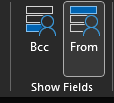
- This will add another field titled "From" this allows for you to select who the email will come from
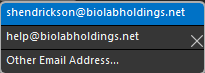
- Make sure that you have to the proper name selected for the email you are sending, because if you switch to the group email address you will continue to send from that address until you switch back to your personal address.